


Let me tell you about a client call I had last month.
They wanted to refresh their hero sections across the site. The design felt dated, the hierarchy wasn't working, and they needed more prominent CTAs.
Their previous developer quoted them 16 hours.
For updating hero sections that all looked basically the same.
Here's what happened:
Their website had hero sections on 12 pages. Each one was built individually. Each one needed to be redesigned, rebuilt, and tested manually. No system. No components. Just 12 unique snowflakes that all happened to serve the same purpose.
With a proper component system?
That's a 2-hour job. Design it once, update everywhere, done.
This is what I mean when I talk about Webflow components. Not some nerdy developer obsession with perfect organization. We're talking about the difference between paying for 16 hours of work versus 2 hours. Between launching updates in days versus weeks. Between a website that scales with your business versus one that becomes a bottleneck.
The Real Cost of Building Without Components
I see this pattern constantly with SaaS companies and startups who come to me for website migrations or redesigns.
They launched fast (good). They hired someone who could "do Webflow" (also good). The site looked great on day one (excellent).
Then reality hit.
Six months later, they want to refresh their visual hierarchy. Marketing needs to update hero sections. Sales wants consistent testimonial layouts across pages. The CEO spotted that the pricing page doesn't match the new brand direction.
Each change takes longer than expected. Each update requires the developer to rebuild elements. Things that should cost $300 somehow become $1,500 invoices. And nobody can quite explain why.
The culprit? Every element on the site was built as a one-off.
Research from multiple design systems teams shows that proper component systems deliver 38% better efficiency for design teams and 31% better efficiency for development teams. That's not marginal. That's the difference between a 16-hour project and a 10-hour project. Between $1,600 and $1,000.
Nathan Curtis, one of the leading voices in design systems, puts it simply: "A system's value is realized when products ship features that use a system's parts."
Translation? Components aren't valuable sitting in a library. They're valuable when they save you time and money on real work.
What This Actually Means for Your Business
Here's what nobody tells you about component systems: the upfront cost is higher, but the payback is fast.
A component-based Webflow site typically costs 15-20% more to build initially. On a $15,000 project, that's around $2,250-3,000 extra.
But here's what you get for that investment:
Speed that compounds over time.
That hero section refresh I mentioned? Without components: 12-16 hours. With components: 2-3 hours. Every single update becomes faster. Not just a little faster. 5-8x faster.
Predictable costs.
When I tell a client "that redesign will take 3 hours," I can deliver on that. The component system makes work predictable, which makes budgets predictable. No more surprise invoices.
Design changes that don't require rebuilds.
Want to update your button styles across 50 pages? Without components, that's a day's work minimum. With components, it's 20 minutes. Want to change your testimonial card layout? Same thing.
Easier team handoffs.
What happens when your developer goes on vacation? Or you bring in another agency? A well-structured component system means anyone competent can jump in without starting from scratch.
Here's a real example: I worked with a SaaS company last quarter that needed a brand refresh across 35 pages. Previous agency quoted 4-5 weeks and $12,000.
With a component-based system already in place, they did it in 8 days for $4,500.
The difference? I wasn't rebuilding hero sections 35 times. I wasn't creating new testimonial cards for each page. I updated the components once and let the changes cascade everywhere.
When You Actually Need This
Not every website needs a complete component system.
If you're a consultant with a 5-page website that changes twice a year, you don't need this. You're paying for infrastructure you won't use.
But if any of these sound like you, components aren't optional:
You're a SaaS company.
Your product evolves constantly. Features get added. Pricing changes. Marketing pages need updates. A component system is the difference between keeping pace with product or always being three months behind.
You have 15+ pages.
Once you cross this threshold, maintenance burden becomes real. Updates take time. Consistency requires effort. Components solve both problems.
You refresh your design regularly.
If you're the kind of company that updates visual direction, experiments with layouts, or evolves your brand, components are essential. Without them, each refresh becomes a rebuild.
You're scaling.
More pages. More features. More team members making updates. Components provide the guardrails that let you grow without things falling apart.
Studies show that design systems reach peak ROI around 80% component coverage. Beyond that, you hit diminishing returns. This aligns with the Pareto principle: 80% of your needs can be solved with 20% of the work, if you build the right components.
The Numbers That Actually Matter
Let me show you what this looks like with real project data.
Hero Section Visual Refresh:
- Without components: 12-16 hours
- With components: 2-3 hours
- Savings: $1,000-1,300 at $100/hour
Testimonial Layout Redesign:
- Without components: 6-8 hours
- With components: 1-1.5 hours
- Savings: $500-650
Full Brand Refresh (35 pages):
- Without components: 30-40 hours
- With components: 8-12 hours
- Savings: $2,200-2,800
New Feature Section Pattern:
- Without components: 10-14 hours
- With components: 3-4 hours
- Savings: $700-1,000
Over a year, if you make 2 major visual refreshes, 4 section redesigns, and 6 new page patterns, you're looking at roughly $18,000-24,000 in developer time without components versus $6,000-9,000 with components.
That's a $12,000-15,000 difference. Every year.
Remember that 15-20% upfront cost? On a $15,000 project, you pay an extra $2,250-3,000. You make that back in the first year. Then you keep saving.
Curtis notes that as component libraries grow, there's a natural tension: "As you grow a design system's library, a UI component's average cost increases while its value to the community decreases."
This is why you don't need components for everything. You need them for the patterns you actually use repeatedly. The 80% that matters.
What Good Component Systems Look Like
If you're hiring a Webflow developer or agency, here's what to ask:
"Will this be built with a component system?"
If they say yes, ask them to show examples. Ask how updates will work. Ask what happens when you need to refresh your design in 12 months.
"How long would it take to redesign all hero sections on the site?"
The answer should be "a few hours." If they start calculating based on page count, that's a red flag. With proper components, page count shouldn't matter much.
"Can you show me your component library from another project?"
Any developer who works this way should have examples. They should walk you through organization, reusability, and customization.
"What happens if we rebrand next year?"
You want to hear about how components make this manageable. If they talk about rebuilding everything, they're not thinking systematically.
Red flags:
- Dirt-cheap pricing (you'll pay more later)
- No mention of long-term maintenance
- Everything is "custom" and "unique"
- No clear process for design updates
- Can't explain their system in plain English
Curtis emphasizes that design systems shouldn't restrict creativity: "Systems solve the easy problems so products can solve hard problems more easily."
Good components give you speed on the repeatable stuff. That frees you up to invest in the unique stuff that actually differentiates your business.

Why This Matters in 2025
Components aren't about being organized for the sake of organization.
They're about making your website work for your business instead of creating busywork.
- They're about moving fast when you need to move fast.
- They're about predictable costs and no surprises.
- They're about building something that evolves as you evolve.
The research is clear:
teams with proper design systems are 30-40% more efficient. That efficiency translates directly to cost savings, faster launches, and better consistency.
Most importantly, they're about respecting your time and budget. Because if you're spending thousands every year on updates that should take hours, you're not investing in your website. You're paying a maintenance tax on poor architecture.
And in 2025, with how fast companies need to move, you can't afford that tax.
The Overview
Do I need components if my site is small?
If you have fewer than 10 pages and rarely update your design, probably not. But if you plan to grow or regularly refresh your visual direction, yes. Even small sites benefit from components when they're actively maintained.
How much more expensive is the initial build with components?
Typically 15-20% more upfront. On a $15,000 project, that's around $2,250-3,000 extra. Research shows you'll recover that cost within the first year through faster updates and lower maintenance costs.
Can components be added to an existing Webflow site?
Yes, but it's often more work than building with them from the start. Depending on how the site is structured, it might involve significant refactoring. Sometimes a rebuild is more cost-effective than retrofitting.
How do I know if my developer is actually using components properly?
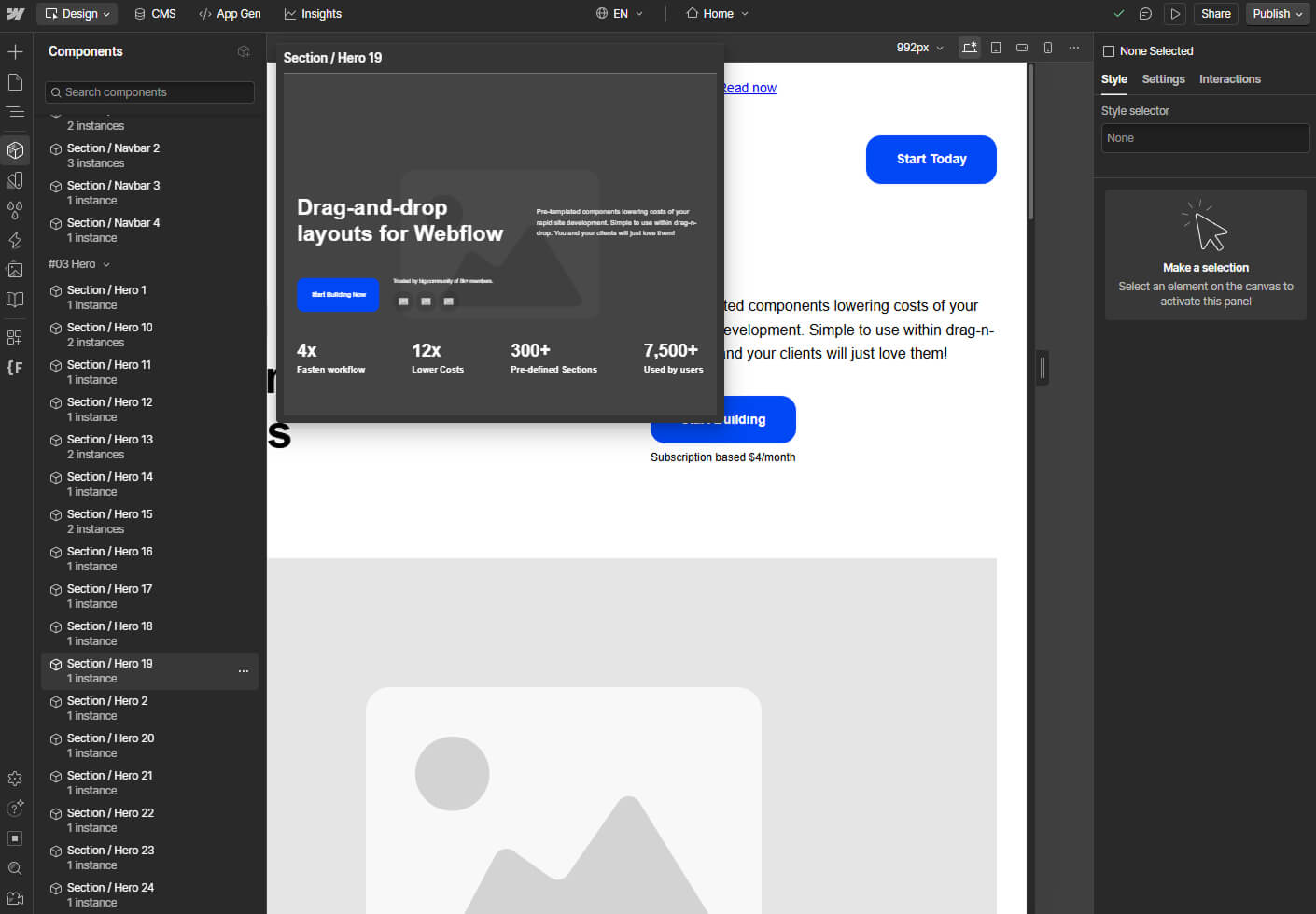
Ask to see the component panel in the Webflow Designer. A well-structured site should have a clear library of reusable components. Ask them to show you how they'd update something sitewide. It should be quick and demonstrate the cascade effect.
Will components slow down my site?
No. Components are a development tool, they don't affect front-end performance. What matters is how the site is built overall (image optimization, code cleanliness, etc.), not whether components were used in the build process.
What percentage of my site should be component-based?
Research suggests 80% coverage is the sweet spot. Beyond that, you hit diminishing returns. Focus on patterns you use repeatedly: buttons, cards, hero sections, testimonials, CTAs. Don't worry about one-off elements that appear once.
